






Free Aura Player with 12M & 24M PlansClaim 24h Free Trial →
GalaxyIPTV Intergalactic 4K
Power-User 4K Benchmark • Multi-Screen & Hardware Acceleration
ORA PRO Logo

ORA PRO

Engineered specifically for demanding power users and live sports enthusiasts. Features multi-view picture-in-picture, ultra-stable HEVC hardware decoding, and native support across Android TV, Firestick, Apple iOS, Smart TVs, and Windows PC.

Supported Platforms & Devices
Android TV / Google TV Amazon Fire TV 4K Android Mobile (APK) iPhone & iPad Windows PC (.exe) LG webOS Samsung Smart TV
Direct Downloads & Store Links
iPhone & iPad (App Store)
Firestick / Android TV Downloader5290692
ACTIVATE YOUR ORA PRO ACCOUNT IMMEDIATELY
Step-by-Step 4K Remote Setup
Authentic 4K Smart TV Experience

ORA PRO in Action with GalaxyIPTV

Ultra-high refresh rate sports engine running smoothly on a 4K television with preloaded GalaxyIPTV channels, 4K movies, and series.
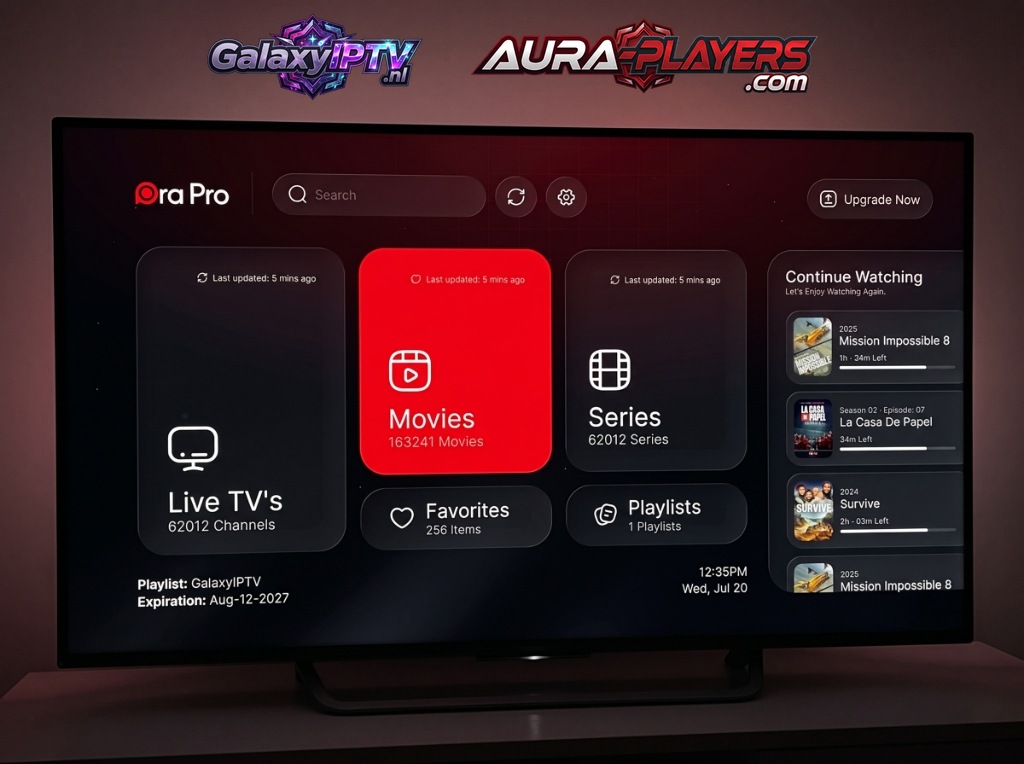
ORA PRO Media Player running live on a 4K Smart TV showing GalaxyIPTV playlist
Live Channels25,600+ Streams
VOD Movies163,000+ Titles
VOD Series62,000+ Episodes
Playlist SyncGalaxyIPTV Active

Why ORA PRO Is Our Top Power-User Recommendation

Engineered from the ground up for extreme throughput and stability. ORA PRO supports hardware-accelerated HEVC/H.265 video playback, multi-screen quad-viewing, and intelligent cache buffering to guarantee stutter-free sports streaming even during peak traffic.

Quad-Screen Multi-View Sports

Never miss a second of simultaneous action. Watch up to four live matches side-by-side with individual audio selection, dynamic zoom, and 60 FPS fluidity.

  • Sub-second channel switching with hardware decoder pass-through
  • Cinematic electronic program guide (EPG) with 7-day replay
  • Comprehensive audio sync and multi-language subtitle selector
  • Official Windows PC native client for seamless multi-monitor setups
  • Xtream Codes API & cloud playlist synchronization
Official Certified IPTV Player
ORA PRO Official Logo

ORA PRO STREAMING SUITE

Ultra-Low Latency 4K HEVC Playback Engine

Zapping<0.2s Fast
Resolution4K UHD 60fps
Multi-View4 Screens
Complete Cross-Platform Ecosystem
Android TV Firestick Windows PC iOS & Apple TV LG webOS Samsung TV
Easy Remote Configuration

How to Setup ORA PRO in 3 Easy Steps

Follow our 3-step setup guide below to install, note your codes, and connect your GalaxyIPTV lineup in minutes.

1

Install ORA PRO

On Firestick or Android TV, enter code 5290692 in the Downloader app. On iPhone/iPad, search the Apple App Store for "ORA PRO". On Windows PC, run the direct .exe installer above.
2
0/7
0/7
FILL IN THE DATA FROM YOUR APP

Activate Your License

Launch the app to reveal your unique Device ID and Device PIN. Enter it on www.aura-players.com or send it directly to our technical flight crew via WhatsApp, after entering the player DEVICE ID and DEVICE PIN above first!

3

Enjoy All of Your Content in 4K UHD

Enjoy infinite channels, movies, and series with zero buffering and lightning-fast zapping. Once your Device ID and Device PIN are received, our flight crew remotely injects your complete 25,000+ channel lineup and 160,000+ VOD catalog within 2 minutes. Sit back, relax, and stream premium sports and entertainment!

FILLED IN THE DEVICE ID AND DEVICE PIN

Explore Other Compatible Players

Galaxy IPTV supports a complete suite of verified players including IBO ONE, Aura Player, DuoCast, and Gravity Player.