






Free Aura Player with 12M & 24M PlansClaim 24h Free Trial →
GalaxyIPTV Intergalactic 4K
Arctic High-Speed Cross-Platform & Smart TV Edition
Hot ORA IPTV Logo

HOT ORA IPTV

A clean, light-arctic edition engineered across Windows PC, Android TV & Google TV, Android Phones, plus the native application stores of Samsung Smart TV (Tizen OS 2016+) and LG Smart TV (webOS). Zero tedious typing—activate remotely via your unique Device ID & Device PIN!

Supported Platforms & Devices
Windows PC (.exe) Android TV / Google TV Amazon Fire TV 4K Android Mobile (APK) Samsung Smart TV LG webOS Smart TV
Direct Downloads & TV Store Guides
Windows (.exe Download)Android TV / Firestick (8075513)Android Mobile (APK)
Authentic 4K Smart TV Experience

Hot ORA IPTV in Action with GalaxyIPTV

See the clean arctic interface of Hot ORA IPTV running live on a modern 4K Smart TV with loaded GalaxyIPTV channels, cinema movies, and complete series.
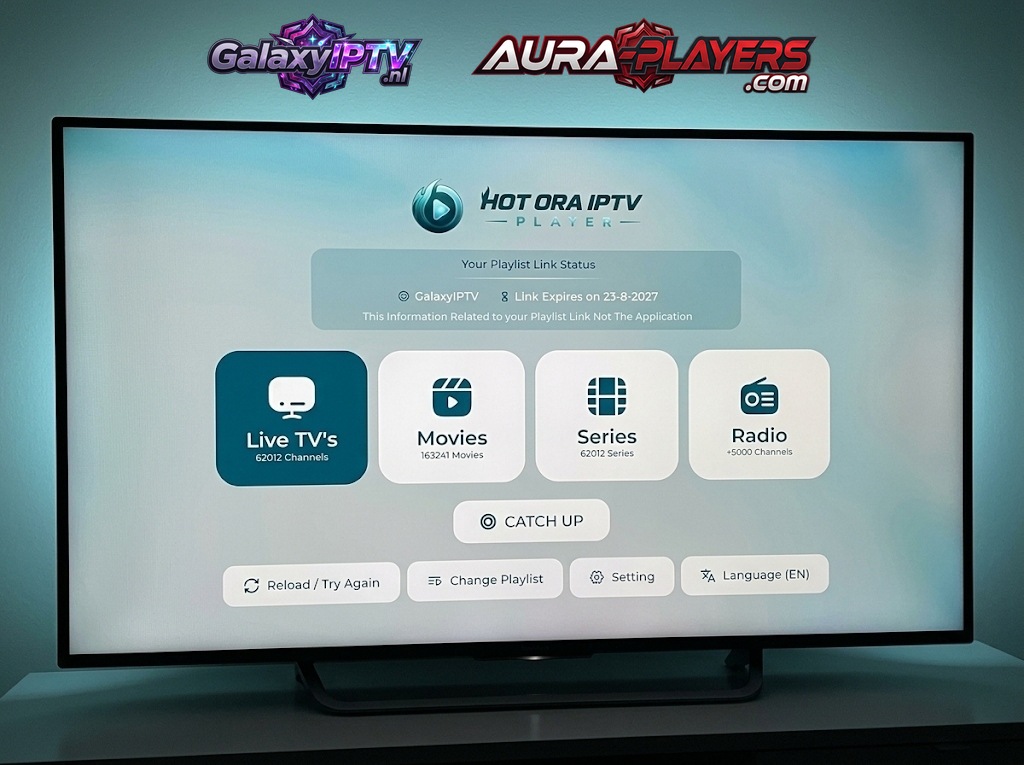
Hot ORA IPTV running live on a Smart TV with GalaxyIPTV playlist link status
Live Channels25,000+ Streams
VOD Movies150,000+ Titles
VOD Series60,000+ Episodes
Playlist SyncGalaxyIPTV Active

Why Hot ORA IPTV Excels on TV, PC & Mobile

Hot ORA IPTV features a crisp, high-visibility interface designed for maximum legibility on both large television displays and high-resolution computer monitors. With dedicated builds for Windows PC, Android TV, Google TV, Android Phones, Samsung Tizen, and LG webOS, it provides zero-lag channel zapping and fluid 60 FPS sports playback.

Remote Setup via Device ID & Device PIN

When you launch Hot ORA IPTV on your television, computer, or phone, your unique Device ID and Device PIN are displayed on screen. Simply enter them in our 3-step setup guide below or message them to us on WhatsApp, and we remotely link your Galaxy IPTV playlist in under 2 minutes!

  • Dedicated Windows PC direct desktop installer (.exe)
  • Universal Downloader shortcode 8075513 for Android TV & Phone APK
  • Native availability in Samsung Smart Hub & LG Content Store
  • Ultra-fast channel zap times (<0.4s) with zero buffering
  • Dedicated Catch-Up TV menu with 7-day replay
  • Multi-language audio track switching and closed captions
Verified Cross-Platform Player
Hot ORA IPTV Logo

HOT ORA IPTV

Arctic High-Definition Streaming Client

PlatformsTV, PC & Phone
Resolution4K 60fps
SetupDevice ID & PIN
Supported Hardware
Windows PC Android TV Android Phone Samsung TV LG webOS
Easy Remote Configuration

How to Setup Hot ORA IPTV in 3 Easy Steps

Follow our 3-step setup guide below to install, note your codes, and connect your GalaxyIPTV lineup in minutes.

1

Install Hot ORA IPTV

Open Downloader on your Android TV or Firestick and enter code 8075513, or install the direct APK on Android phones (http://aftv.news/8075513). On Windows PC, download the direct .exe installer above. On Samsung or LG Smart TVs, search for "HOT ORA IPTV" in your TV app store.
2
0/7
0/7
FILL IN THE DATA FROM YOUR APP

Activate Your License

Launch the app to reveal your unique Device ID and Device PIN. Enter it on www.aura-players.com or send it directly to our technical flight crew via WhatsApp, after entering the player DEVICE ID and DEVICE PIN above first!

3

Enjoy All of Your Content in 4K UHD

Enjoy infinite channels, movies, and series with zero buffering and lightning-fast zapping. Once your Device ID and Device PIN are received, our flight crew remotely injects your complete 25,000+ channel lineup and 160,000+ VOD catalog within 2 minutes. Sit back, relax, and stream premium sports and entertainment!

FILLED IN THE DEVICE ID AND DEVICE PIN

Explore Other Verified Players

Galaxy IPTV supports a complete suite of 7 verified players including IBO ONE, Aura Player, ORA PRO, and DuoCast.