






Free Aura Player with 12M & 24M PlansClaim 24h Free Trial →
GalaxyIPTV Intergalactic 4K
Dedicated Samsung & LG Smart TV Specialist
Gravity Player Logo

GRAVITY PLAYER

A streamlined, high-speed IPTV player purposefully designed for Samsung Smart TVs (Tizen OS 2016+), LG Smart TVs (webOS), and Windows PC. Instant remote playlist activation via your unique Device ID & PIN—no remote typing required!

Supported Platforms & Devices
Samsung TV (Tizen OS 2016+) LG Smart TV (webOS) Windows PC Desktop
TV Store Guides & Desktop Installer
Windows (.exe Download)
Authentic 4K Smart TV Experience

Gravity Player in Action with GalaxyIPTV

Experience the emerald green UI of Gravity Player running on a 4K Samsung Smart TV, complete with pre-synchronized GalaxyIPTV channels, VOD, and EPG.
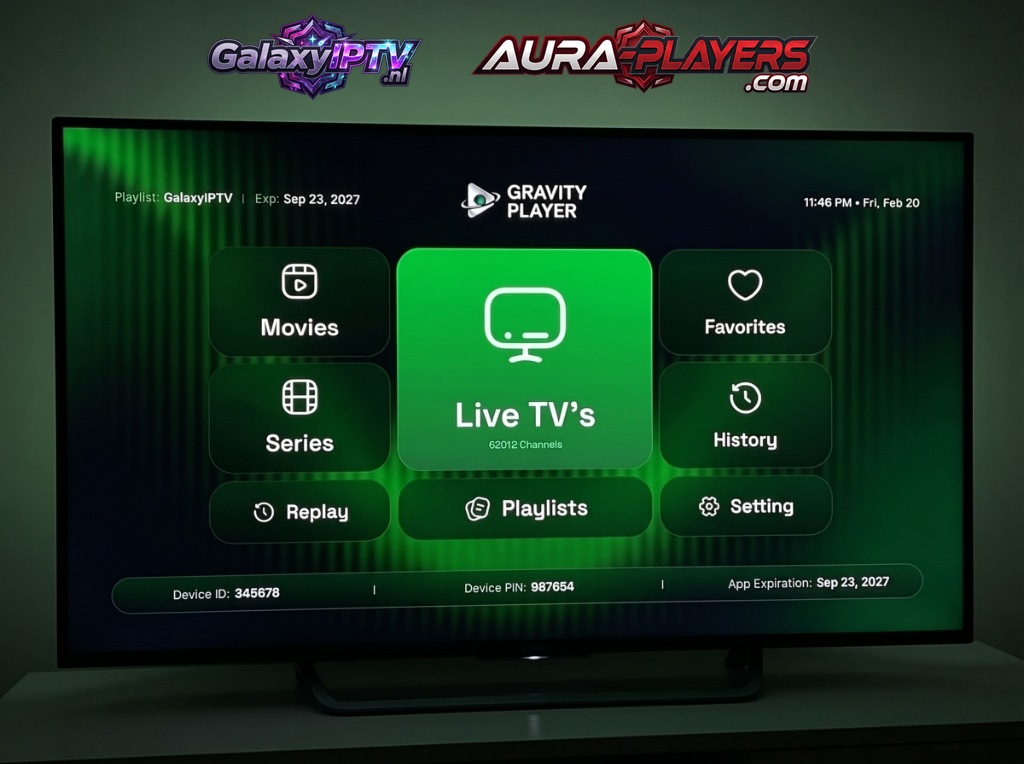
Gravity Player running live on a Samsung 4K Smart TV with GalaxyIPTV channels
Live Channels25,000+ Streams
VOD Movies150,000+ Titles
VOD Series60,000+ Episodes
Playlist SyncGalaxyIPTV Active

Why Gravity Player Stands Out on Smart TVs

Gravity Player provides a native television interface built specifically for the processing architecture of modern Samsung (Tizen) and LG (webOS) chipsets. With ultra-fast hardware video decoding and full remote activation, you never need to deal with complicated URLs.

Dual-Factor Remote Activation (Device ID & PIN)

When you open Gravity Player on your television, the bottom bar reveals your unique Device ID and Device PIN. Send both numbers to our WhatsApp support, and our flight crew connects your 25,000 channels instantly!

  • Engineered specifically for Samsung Smart TV (Tizen 2016+) & LG webOS
  • Interactive 7-day electronic program guide (EPG) with replay support
  • Zero typing: remote playlist injection via Device ID & PIN
  • Dedicated Windows PC client for multi-screen home viewing
Certified Tizen & webOS Engine
Gravity Player Logo

GRAVITY PLAYER

High-Speed Smart TV & Desktop Streaming

PlatformSamsung & LG
Resolution4K UHD
SetupID + PIN
Supported Hardware
Samsung TV (2016+) LG webOS Windows PC
Easy Remote Configuration

How to Setup Gravity Player in 3 Easy Steps

Follow our 3-step setup guide below to install, note your codes, and connect your GalaxyIPTV lineup in minutes.

1

Install Gravity Player

Open Apps on your Samsung Smart TV (Tizen 2016+) or the LG Content Store and search for "GRAVITY PLAYER". On Windows PC, download and run the direct installer (.exe) above.
2
0/7
0/7
FILL IN THE DATA FROM YOUR APP

Activate Your License

Launch the app to reveal your unique Device ID and Device PIN. Enter it on www.aura-players.com or send it directly to our technical flight crew via WhatsApp, after entering the player DEVICE ID and DEVICE PIN above first!

3

Enjoy All of Your Content in 4K UHD

Enjoy infinite channels, movies, and series with zero buffering and lightning-fast zapping. Once your Device ID and Device PIN are received, our flight crew remotely injects your complete 25,000+ channel lineup and 160,000+ VOD catalog within 2 minutes. Sit back, relax, and stream premium sports and entertainment!

FILLED IN THE DEVICE ID AND DEVICE PIN

Explore Other Verified Players

Galaxy IPTV supports a complete suite of 7 verified players including IBO ONE, Aura Player, ORA PRO, and DuoCast.